
Project Intelligence

Know project
health before
status meetings.

Asa turns connected Slack, Teams, Telegram and WhatsApp conversations into project status, blockers and next steps. New messages are grouped for context, with catch-up when you open or refresh a project.

Read-only · no DMsCatch-up in minutes6 months of history
#q4-launch· 14 members
Friday · 14:02
PR
Priya13:58

Still blocked on the auth API — Sergei says we'll have a fix by Tue.

SK
Sarah14:01

@asa where are we on Q4-launch?

AsaAsajust now · summarised 4 channels

Q4-launch is on watch. Design and copy are clear; auth integration is the only critical-path blocker. Sergei owns the fix; ETA Tue. Two QA cards opened today, none severe.

Health
Watch
Momentum
+12% wow
Next step
Unblock auth
Reads conversations in
SlackSlackMicrosoft TeamsMicrosoft TeamsTelegramTelegramWhatsAppWhatsApp
See it in action

From team chat,
to project clarity.

See how Asa turns Slack and Teams conversations into a clear project brief with blockers, decisions and next steps, catching up on new messages when you open a project.

How it reasons

From chatter
to clear action.

Project Intelligence runs a simple, honest loop on the conversations you point it at: capture the signals, analyse what they mean, and hand managers the next move — with a suggested owner.

01Capture signals

The updates,
blockers and
decisions.

Automatically pull the meaningful project moments straight from your team's daily chat — no forms, no status meetings, no manual entry.

Project updatesBlockersDecisions
02Analyze insights

What changed,
what's at risk,
where momentum is.

Summarize recent project messages without manual data entry. Asa ties every claim back to the messages and people it came from.

What changedAt riskMomentum
03Drive actions

The next step,
and who
should own it.

Give managers practical next steps and suggested owners to protect timelines and team capacity — then decide for yourself.

Suggested ownerNext stepTeam capacity
Conversation mapping

Connect the chats that belong to one project.

Choose the Slack, Teams, Telegram and WhatsApp conversations that represent the real delivery work — and Asa starts extracting useful signals. Public or private, always read-only.

  • One project, many rooms — map all the channels a project lives in.
  • Never reads DMs — only channels where Asa is invited.
  • Across platforms — field crew on WhatsApp, engineers on Slack, one timeline.
asa.team · Project setup · Conversations
Connected channels

Slack#q4-launchReading
Microsoft TeamsLaunch · daily standupReading
WhatsAppVendor — AcmeReading
AsaQ4-launch · Intelligence
just now · summarised 4 channels
Health
On watch
Momentum
+12% wow
Risks
1 critical
BlockerToday · Teams

Auth API blocker — owner Sergei, ETA Tuesday.

DecisionWed · Slack

Ship onboarding without referral flow; revisit in v1.1.

UpdateMon · WhatsApp

Vendor confirms art delivery by Friday EOD.

Signals & insights

Blockers, decisions and risk in one view.

Project Intelligence turns connected conversations into a health summary with active blockers and recent updates — so managers understand what changed before the next status check-in.

Asa@asa /summary→ health, blockers and what changed this week
Action workspace

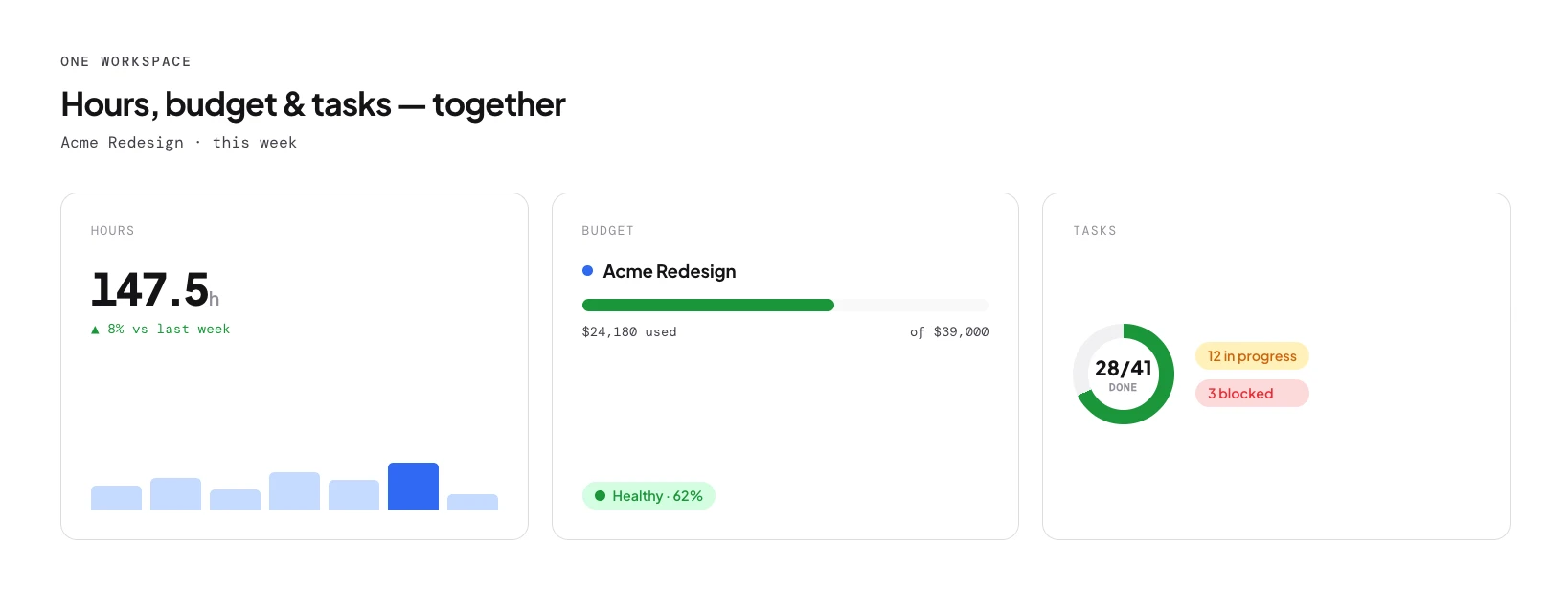
Hours, budget and tasks — same workspace.

Move from signal to action without leaving the project. Review budget usage, allocation and follow-up tasks alongside the intelligence feed — every claim traces back to the data.

Explore Project Tracking→
asa.team · Q4-launch · Hours & budget
Asa.Team — hours, budget and tasks in one workspace
AI assists, you decide

The recommendation is Asa's. The decision is yours.

Managers get early visibility, practical recommendations, and the final say on every next move. Asa never acts on your team without you.

Asa assists

Surfaces blockers, drafts the brief, suggests an owner and a next step — backed by the messages it read.

Human decides

You confirm the owner, adjust the plan and make the call. Asa keeps the record, not the control.

Project Intelligence FAQ

Good to know.

What messaging platforms does Project Intelligence support?+

It integrates directly with Microsoft Teams, Slack, Telegram and WhatsApp. You can connect multiple channels from different platforms to a single project.

Does it read private messages (DMs)?+

No. Project Intelligence only reads the specific public or private channels where the Asa bot has been explicitly invited and configured. It never accesses direct messages or personal chats.

How quickly do signals appear?+

Asa captures messages as they arrive and groups rapid messages to understand context. When you open or refresh your project dashboard, new signals typically appear within a few minutes.

What if one project spans multiple platforms?+

Asa aggregates them seamlessly. If your field team uses WhatsApp and your engineers use Slack, it pulls updates from both and organises them into one unified timeline.

Do I need an admin to set it up?+

To connect a new integration to your workspace, yes. Once it's active, any project owner can invite the Asa bot to their channels and map them to a project.

Is Project Intelligence included in all plans?+

Starter includes one watched project, Growth includes 20, and Scale and Enterprise have no watched-project cap. Standard tiers retain six months of intelligence history.

Free for small teams · No credit card

Start using Project Intelligence.

Connect a conversation source to a project. Asa groups new messages for context and catches up when you open or refresh the project. Starter includes one watched project; Growth includes 20, with no watched-project cap on Scale and Enterprise.

Read-only · no DMsCatch-up in minutes6 months of history